emsCharts v4 Release Notes - v4.75 - May 20, 2020
- Chad Hurka (Unlicensed)
- Lindsey Kelley (Unlicensed)
Owned by Chad Hurka (Unlicensed)

emsCharts v4.75 (Sprint 73, 74, 75 )
May 20, 2020
Table of Contents
New in This Release
New Feature Highlight:
The following new features are the most impactful for users, so we describe them here in greater detail:
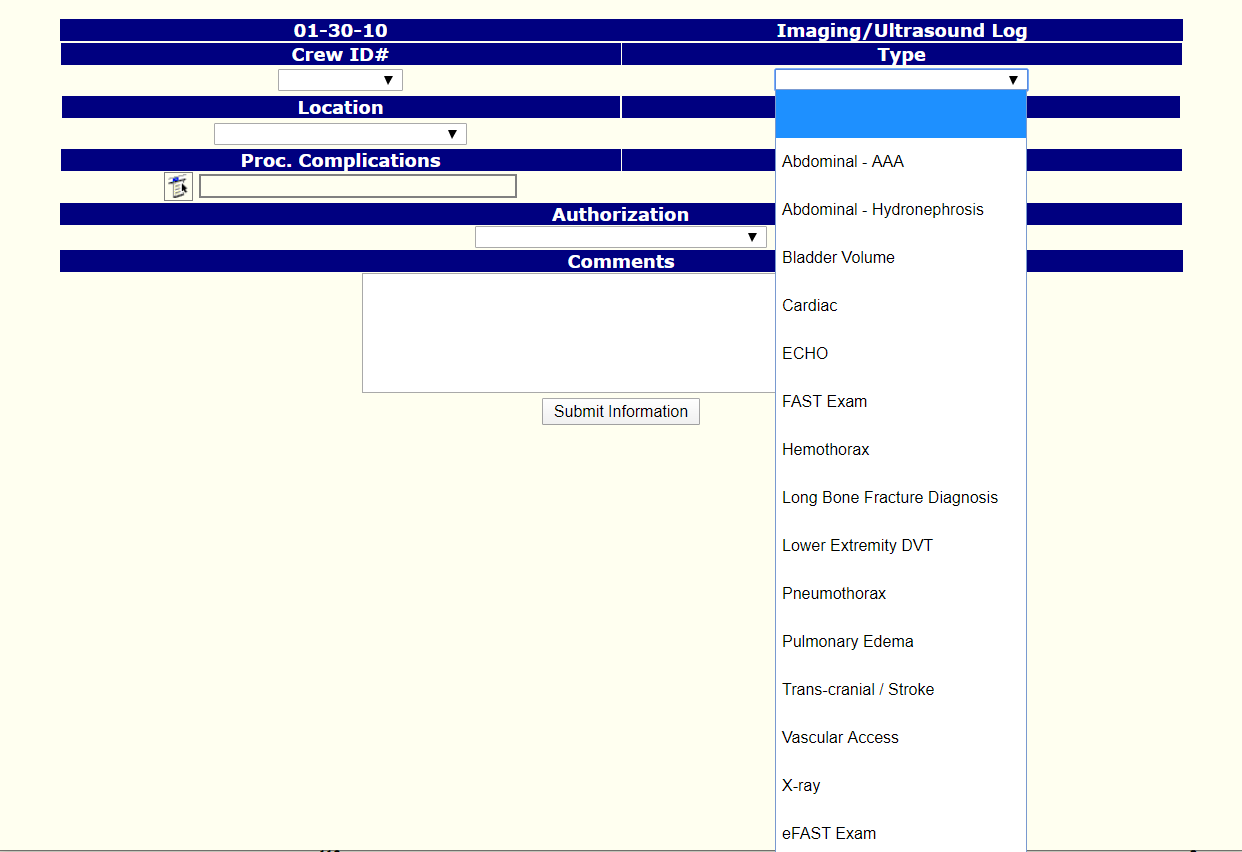
New Procedure - Imaging / Ultrasound
A new procedure on page 8 has been added to allow users to document imaging and ultrasound.
|
| Fig 1 - Imaging/Ultrasound in the Add Action List on Page 8. |

|
| Fig 2. - List of possible Imaging/Ultrasound types within the Imaging/Ultrasound Procedure. |
New Feature - Custom Form Web Signatures
|
| Fig 1. - Custom Form Web Signatures |
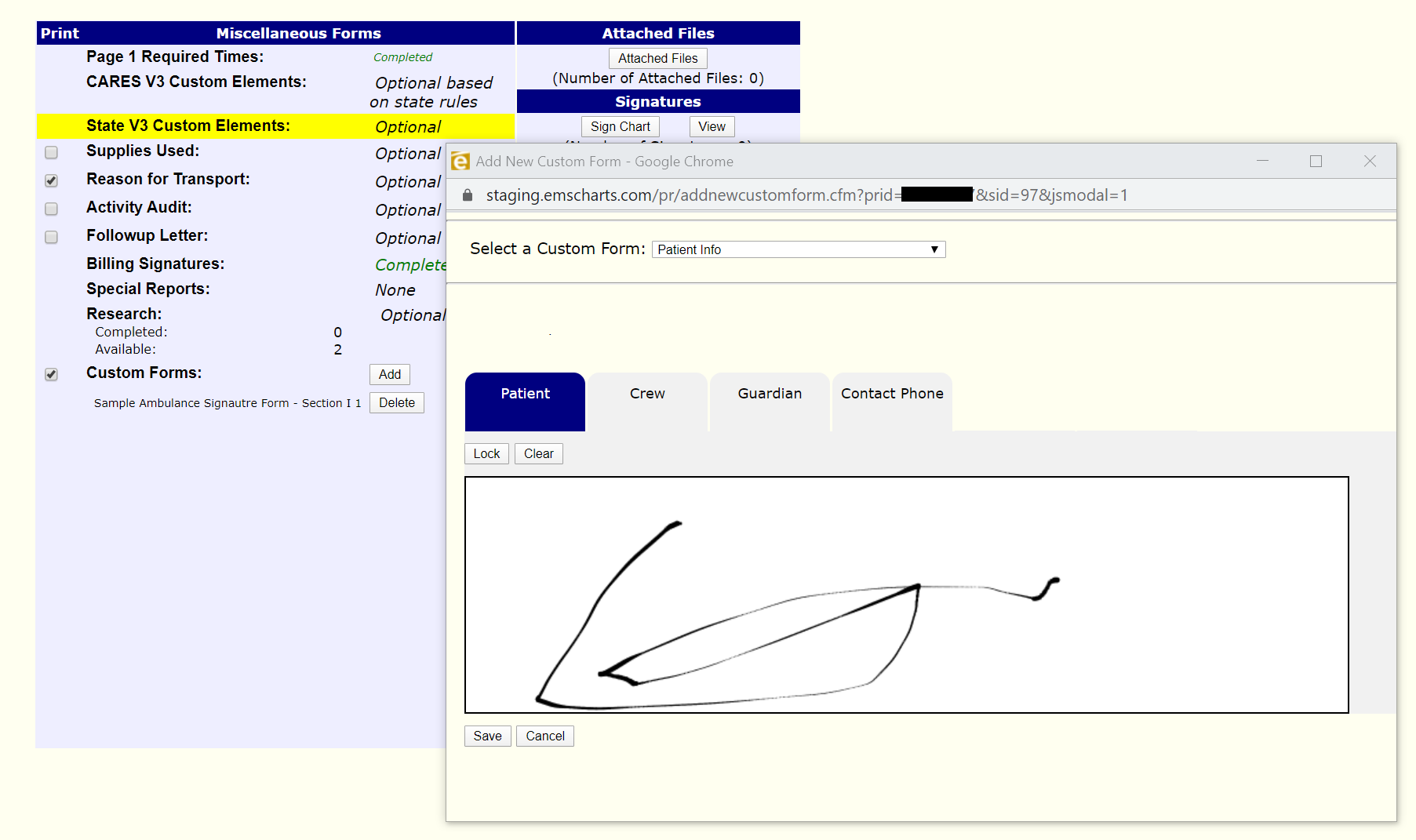
How to Configure:
- Configuration → Code Tables → Mobile / Tablet Custom Forms
- Add or Edit an existing form.
- Add desired signature fields.
How to Access:
- In a Patient Care Record → Page 9
- Custom Forms (Found under Miscellaneous Forms)
- Select the desired form
New Features
The following features have been added in this release:
| Key | Summary | Release Notes |
|---|---|---|
| EMC-9047 | Legacy: Custom Form Web Signatures | Covered in the "New Feature Highlight" above, we have added the ability to capture signatures on the web to Legacy. This web functionality was formerly only in emsCharts Gold. |
| EMC-9042 | Legacy: Patient Safety Work Product (PSWP) Message | Added a Patient Safety Work Product (PSWP) Message that will be viewed in the page 9 activity audit, Adding/Viewing QA flags, Adding/Viewing Special Reports and creating new Activity Audit questions. This message is customizable and will not display if it is not configured. |
| EMC-9200 | Legacy: Auto-Save Narrative | The Legacy narrative will now auto-save every 5 seconds. |
| EMC-9253 | Legacy: Display and print narrative on PDF | The Legacy narrative will now be included on the PDF. |
| EMC-9058 | HL7 Legacy: Update Facesheet page to match Gold Facesheet page | Updated the HL7 Face Sheet page to match the layout seen in emsCharts Gold. |
| EPCR-178 | Legacy: Ultrasound | Covered in the "New Feature Highlight" above, the Ultrasound procedure was added to Legacy. |
| EPCR-9 | Google Addresses on P1 and Patient Page | On both Page 1 and the Patient Page, there is a field (label: Google) where users may type and address. Accepting the address will auto populate any respective address fields. The advantage to this feature is that it uses Google to lookup an address. Thus, users can typically type just a few characters rather than typing out the whole address. In addition, it reduces spelling mistakes on manually entered addresses. |
Improved in This Release
The following issues have been addressed and resolved in this release:
Page 1
| Key | Summary | Release Notes |
|---|---|---|
| EMC-9108 | Legacy: Crew Search Missing from Page 1 | In a recent release, the crew lookup on page 1 was removed unintentionally in the course of addressing a separate issue. The complementary issue is now resolved and the crew search has been added back in. |
Patient Page
No changes.
Page 2
No changes.
Page 3
No change.
Page 4
No change.
Page 5
No change.
Page 6
No change.
Page 7
No change.
Page 8
No change.
Page 9
No changes.
Other
| Key | Summary | Release Notes |
|---|---|---|
| EMC-9241 | Legacy: PDF Signature Form still does not fill page when printed | Increased PDF Custom Signature Forms width and height for printout. |
| EMC-9192 | Legacy: Data Validation Actions Code Table: Odometer | Fixed a bug related to displaying Data Validation Actions for Odometer/Mileage fields. |
| EMC-9148 | Legacy: Custom Assessments Multi pick Fields Not Showing Properly on Print Page. | Fixed an issue where custom procedure assessment data was not showing on the print summary page. |
| EMC-9198 | Chart Locking Issue Assessment Procedure Complications | Fixed an issue where validations did not work when applied to procedure complications. |
| EMC-9190 | Legacy: Hospital Login QA Search Missing Template | Fixed an error on the QA/RD search page when trying to search for records after previously viewing a chart. |
| EMC-8328 | Legacy: Data Validation Membranes Intact/Amniotic Fluid | Fixed a Data validation issue for the "Membrane Intact " and "Membrane/Amniotic " fields. |
Known Issues
The following issues have already been identified and will be addressed in a future release: